


ActiveCampaign email automation allows businesses to send emails automatically based on user actions, timing, and behavior. This helps improve engagement, save time, and create consistent communication without manual work. This powerful ActiveCampaign email automation guide helps businesses automate communication and increase productivity instantly.
Introduction
Email automation is one of the most powerful features in modern marketing platforms. Instead of sending messages manually, automation systems respond instantly when subscribers interact with your content.
ActiveCampaign provides advanced automation tools that allow businesses to build workflows, segment contacts, and personalize communication. These automated campaigns help manage leads and guide customers through the sales process. Using a proven ActiveCampaign email automation guide allows marketers to create smarter workflows and deliver messages at the perfect time.
This article may contain affiliate links. If you purchase through these links, we may earn a commission at no additional cost to you.
Personal Inside
In real workflows, the most reliable automation systems are simple and structured. Many beginners try to build complicated sequences too early, which often creates confusion and errors.
Starting with a basic automation and improving it over time usually produces better results.
Build Your First Email Automation With ActiveCampaign

What Is Email Automation in ActiveCampaign?
Email automation is a system that sends messages automatically when specific events occur.
These events are called triggers.
Examples include:
User subscribes
User clicks a link
User downloads a file
User purchases a product
User visits a page
Automation ensures timely communication.
Key Components of Email Automation
| Component | Purpose | Example |
|---|---|---|
| Trigger | Start workflow | User subscribes |
| Condition | Control logic | If email opened |
| Action | Perform task | Send email |
| Delay | Control timing | Wait 1 day |
| Tag | Organize contacts | Add tag |
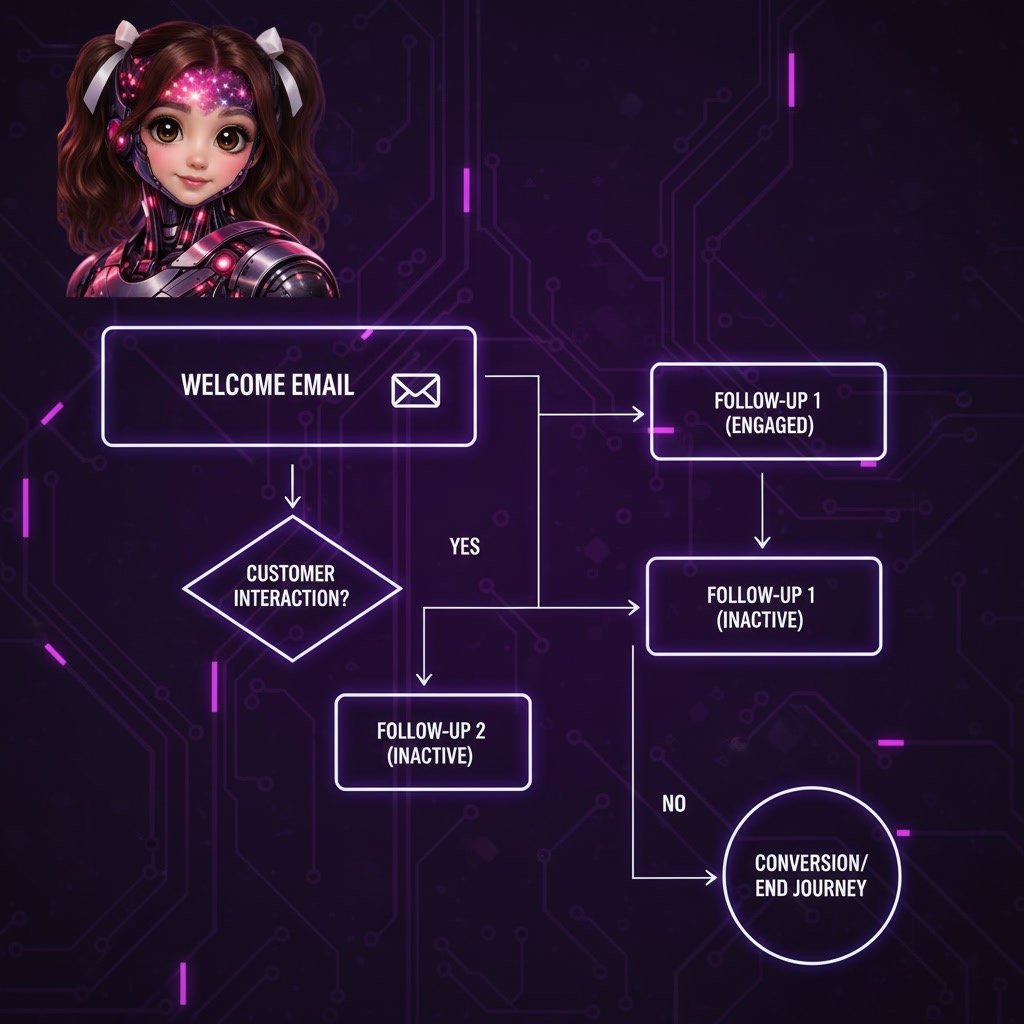
ActiveCampaign Email Automation Setup
Setting up automation does not need to be complicated. A clear process helps beginners build reliable workflows quickly. This step-by-step ActiveCampaign email automation guide explains how to create automated campaigns that deliver results.
Create a Trigger
Every automation begins with a trigger. A trigger tells the system when to start sending emails. Common triggers include new subscriptions, purchases, or form submissions.
Typical triggers:
• User signs up for a newsletter
• Customer completes a purchase
• Subscriber downloads a resource
• Contact clicks a link
Choosing the right trigger ensures your automation starts at the correct moment.
Design the Workflow
After selecting a trigger, the next step is building the workflow. A workflow defines what happens after the trigger occurs.
A simple workflow may include:
• Sending a welcome email
• Waiting for a specific time period
• Sending a follow-up message
• Assigning a tag to the contact
A well-structured workflow improves efficiency and keeps communication organized.
Test the Automation
Testing is essential before launching a campaign. Even small configuration errors can affect performance. Running tests helps ensure emails are delivered correctly and at the right time.
Testing helps:
• Verify email delivery
• Confirm timing accuracy
• Check personalization settings
• Prevent technical issues
Reliable testing is a critical step in every successful automation process.
Step-by-Step: How to Create Email Automation in ActiveCampaign
Step 1 — Choose a Trigger
Select an event that starts automation.
Examples:
Form submission
Email subscription
Purchase completion
Link click
Triggers activate workflows.
Step 2 — Add Conditions
Conditions define when actions happen.
Examples:
If user opens email
If user clicks link
If user visits page
Conditions improve targeting.
Step 3 — Define Actions
Actions are tasks performed automatically.
Common actions include:
Send email
Add tag
Move contact
Send notification
Grant access
These actions complete automation.
Step 4 — Activate the Automation
After configuration:
Enable automation
The workflow begins running automatically.
Example Email Automation Workflow
| Step | Action | Result |
|---|---|---|
| 1 | User subscribes | Trigger activated |
| 2 | Send welcome email | User receives message |
| 3 | Wait 1 day | Timing controlled |
| 4 | Send follow-up email | User engagement increases |
| 5 | Add tag | Contact segmented |
Why This ActiveCampaign Email Automation Guide Improves Marketing Results
A structured automation strategy helps businesses deliver timely messages and build stronger customer relationships. Following this ActiveCampaign email automation guide ensures workflows are reliable, efficient, and easy to scale as your audience grows.

Benefits of Email Automation in ActiveCampaign
Email automation is one of the most powerful features available in modern marketing platforms. Businesses that implement automation workflows can save time, increase engagement, and build stronger customer relationships. Following a structured ActiveCampaign email automation guide helps ensure campaigns run smoothly and deliver consistent results.
Save Time with Automated Workflows
Automation removes repetitive manual tasks and allows marketers to focus on strategy instead of routine work. Once workflows are configured, emails are sent automatically based on user behavior.
Key advantages include:
• Faster response times
• Reduced manual work
• Consistent communication
• Improved productivity
Using a reliable ActiveCampaign email automation guide makes it easier to create efficient workflows that run in the background without constant monitoring.
Improve Customer Engagement
Automated emails reach subscribers at the right moment, increasing the likelihood of interaction. Timely communication improves trust and keeps customers engaged throughout the customer journey.
Strong engagement leads to:
• Higher open rates
• More clicks
• Better customer retention
• Increased conversions
Businesses that apply proven automation strategies often see measurable improvements in campaign performance.
Best Practices for Successful Email Automation
Effective automation requires planning, monitoring, and continuous optimization. Businesses that follow best practices can build scalable systems that generate predictable results. Applying these powerful strategies within your ActiveCampaign email automation guide helps maximize performance and long-term success.
Keep Workflows Simple
Complex automation sequences often create confusion and increase the risk of errors. Starting with simple workflows makes it easier to identify problems and optimize performance.
Recommended approach:
• Begin with basic sequences
• Add complexity gradually
• Monitor results regularly
• Optimize based on data
Simple systems are easier to maintain and more reliable over time.
Monitor Performance Metrics
Tracking performance metrics helps identify opportunities for improvement. Monitoring results ensures campaigns continue to perform at a high level.
Important metrics include:
• Open rate
• Click rate
• Conversion rate
• Unsubscribe rate
Regular analysis allows businesses to make data-driven decisions and improve campaign effectiveness.
Optimize and Scale Campaigns
Once a workflow performs well, it can be expanded to reach a larger audience. Scaling successful campaigns increases efficiency and drives growth.
Optimization strategies:
• Refine email content
• Adjust timing intervals
• Segment your audience
• Personalize messages
Businesses that continuously optimize automation workflows build stronger engagement and achieve better marketing results.
Advantages of Email Automation
Major benefits include:
Time savings
Consistent communication
Higher conversions
Better lead management
Automated workflows
Scalable marketing
These advantages improve efficiency.
Common Mistakes to Avoid in an ActiveCampaign Email Automation Guide
Many beginners create overly complex workflows too early, which often leads to confusion and poor performance. A clear ActiveCampaign email automation guide focuses on simplicity, testing, and continuous optimization to ensure campaigns run smoothly and deliver consistent results.
Many beginners make these mistakes.
Too many steps
Unclear triggers
Poor timing
Missing follow-up
Overcomplicated workflows
Simple automation usually performs better.
Best Practices for Email Automation
Follow these recommendations.
Start simple
Test workflows
Monitor performance
Use clear triggers
Improve gradually
These practices improve reliability.
Internal Links
You may also want to read:
ActiveCampaign Automation Examples
ActiveCampaign Segmentation Guide
ActiveCampaign Email Delivery Tips
ActiveCampaign Integrations
ActiveCampaign for Beginners
Final Verdict: Is Email Automation Important?
Yes — email automation is essential for modern marketing.
It allows you to:
Save time
Improve communication
Increase conversions
Manage leads
Scale operations
The biggest advantage is running marketing campaigns automatically.
 SolutionsHub Team