

If you want to learn how to use ActiveCampaign without feeling overwhelmed, this guide walks you through the essentials clearly.
Affiliate disclosure: This article may contain affiliate links. If you purchase through these links, we may earn a commission at no additional cost to you.
Introduction
ActiveCampaign is a powerful platform, but it can feel like a lot when you first log in. There are contacts, lists, automations, campaigns, forms, tags, and reports all working together, which is useful once you understand the system.
The good news is that you do not need to master every feature on day one. Most users get better results by learning the core workflow first: add contacts, organize them properly, build a campaign, and then automate follow-up.
This article focuses on the practical side of using ActiveCampaign. You will learn what the platform does, which features matter most, how to apply them in real situations, and what mistakes to avoid as you build your setup.
Personal Insight
One thing that stands out about ActiveCampaign is that it rewards structure. When people struggle with it, the issue is usually not the software itself but a confusing setup with too many lists, unclear tags, or automations built too early.
In most cases, the best approach is to start simple, use only the features you need, and build from there. That makes the platform much easier to manage and much more effective over time.
What Is ActiveCampaign and What Does It Do?
ActiveCampaign is an email marketing and automation platform that also includes CRM and customer experience tools. At its core, it helps businesses send emails, track engagement, organize contacts, and automate communication based on user behavior.
Instead of sending the same email to everyone manually, you can create systems that react to what a contact does. For example, someone who signs up for your newsletter can automatically receive a welcome sequence. Someone who clicks a product link can be tagged for a more relevant follow-up. A sales lead can be moved into a CRM pipeline for personal outreach.
That combination of email marketing, segmentation, and automation is what makes ActiveCampaign useful for growing businesses, creators, agencies, and online stores.

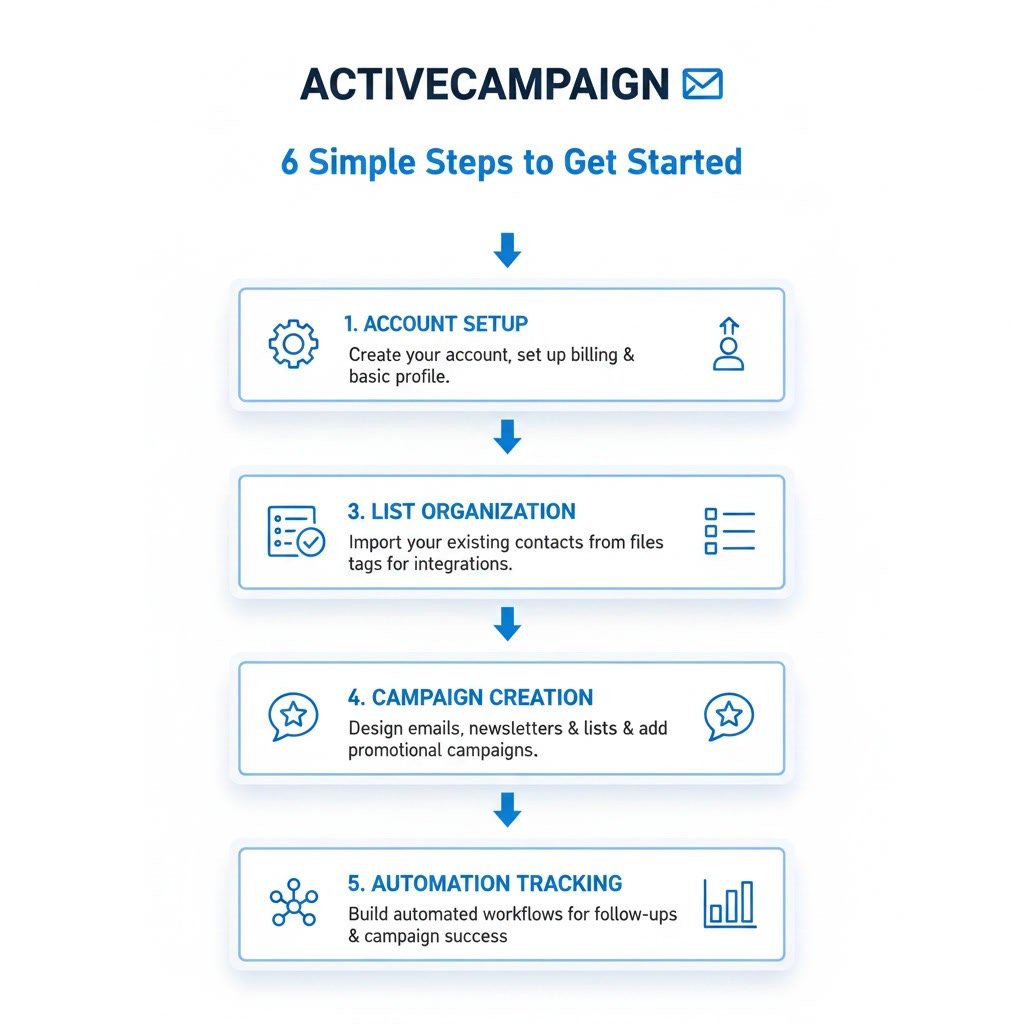
How-to-use-activecampaign: The Core Workflow
1. Set up your account basics
Before you build anything, complete the core setup. Add your sending domain, verify your email address, enter your business details, and adjust branding settings. This helps with deliverability and keeps your account ready for real campaigns.
You should also define your main goal early. For some users, that will be newsletter growth. For others, it may be lead nurturing, appointment booking, or ecommerce follow-up. Knowing the goal helps you choose the right features instead of exploring everything at once.
2. Import and organize your contacts
Once your account is ready, bring in your contacts. ActiveCampaign lets you import CSV files or connect forms and other tools. During import, map fields carefully so names, email addresses, phone numbers, and custom details go into the right places.
This is also the right time to decide how you will organize people. A clean contact structure matters more than most beginners expect. In general, use lists for broad contact categories, tags for behavior or interests, and custom fields for fixed data such as company name or location.
3. Build your first list and signup form
Create a main list that matches your audience purpose, such as newsletter subscribers or leads. Then create a form people can use to join. You can embed forms on your website, use them on landing pages, or connect them through integrations.
Keep the form simple. Ask only for information you actually need. A shorter form often leads to more signups, especially for top-of-funnel offers.
4. Create your first campaign
Campaigns are the emails you send. You can create one-time broadcasts, scheduled newsletters, or targeted messages to selected segments. Start with a simple campaign so you understand the process from subject line to send time.
Choose a clean template, write a focused message, add one clear call to action, and preview the email on desktop and mobile. Then send a test email before going live.
5. Build a basic automation
Automations are where ActiveCampaign becomes especially useful. A beginner-friendly starting point is a welcome sequence. The trigger might be a new form submission or a tag being added. The automation can then send a welcome email, wait a day or two, send a second email, and apply a tag based on engagement.
You do not need a complex workflow to get value. Even a short automation can save time and improve consistency.
6. Track results and improve
After you start sending campaigns and automations, review the reporting. Look at open rates, click rates, unsubscribe rates, and conversion behavior if tracking is enabled. These numbers help you improve subject lines, timing, segmentation, and content quality.
Good use of ActiveCampaign is not just about building things. It is about reviewing what happens and making steady improvements.
Key Features That Matter Most
Email campaigns
Campaigns allow you to send newsletters, updates, promotions, and announcements. You can choose a regular campaign, schedule it for later, or target a specific segment for more relevant messaging.
Marketing automation
This is one of the platform’s strongest features. You can automate onboarding, lead nurturing, follow-up emails, re-engagement flows, and internal notifications. Automations reduce manual work while making communication more timely.
Tags and segmentation
Tags help label contact behavior, interests, or status. Segmentation lets you group contacts using conditions such as tags, list membership, location, activity, or custom field values. This makes your messaging more relevant and less generic.
Forms and lead capture
Forms help collect subscribers and leads directly into your account. Once connected to automations, forms become the entry point for your customer journeys.
CRM tools
If your plan includes CRM features, you can manage deals, sales stages, tasks, and notes. This is especially helpful for service businesses and teams with a structured sales process.
Reporting and analytics
Reports show how contacts interact with your emails and automations. You can use that data to understand what content performs best and where your funnel needs work.
Practical Use Cases for Different Businesses
For bloggers and creators
You can use ActiveCampaign to grow an email list, send a welcome series, deliver lead magnets, and segment readers by interest. This keeps your list engaged without needing to send every message manually.
For service businesses
Service providers can automate inquiry responses, consultation follow-ups, appointment reminders, and lead qualification. Tags and forms are especially useful here because they help sort incoming leads by service type or urgency.
For ecommerce brands
Online stores often use ActiveCampaign for abandoned cart emails, post-purchase follow-up, product recommendations, and customer retention sequences. Behavior-based automations can improve relevance and increase repeat purchases.
For B2B teams
B2B companies can use the platform for lead nurturing, webinar follow-up, sales handoff, and pipeline tracking. Segments and CRM stages help keep marketing and sales aligned.

Best Practices for Using ActiveCampaign Well
Start with one clear system
Do not build five automations before you send your first solid campaign. Start with one practical workflow, such as a welcome sequence or lead follow-up series, and make sure it works well before expanding.
Keep your contact organization clean
A simple structure saves time later. Use lists sparingly, use tags intentionally, and name custom fields clearly. If your organization system becomes messy, your automation logic becomes harder to manage.
Write for people, not just metrics
It is easy to focus too much on open rates and automation logic. But the actual email content still matters most. Clear writing, relevant offers, and useful information usually outperform clever setups with weak messaging.
Test before turning on automations
Always run test contacts through your automation before sending traffic into it. Check that triggers fire correctly, emails arrive in the right order, and tags are applied as expected.
Review automation paths regularly
As your account grows, automations can become outdated. Set time aside to review old sequences, remove unnecessary steps, and update content that no longer fits your audience or offer.
Use segmentation thoughtfully
More segmentation is not always better. Only create segments that help you send better content or improve decision-making. If a segment does not change what you send or how you act, it may not be worth maintaining.
Common Mistakes to Avoid
Creating too many lists
One of the most common beginner mistakes is using multiple lists when tags or segments would be more practical. Too many lists can create duplicates, confusion, and harder reporting.
Building complex automations too early
Advanced automation can be useful, but it often creates problems when built before the basics are clear. Start with simple workflows and expand only when you understand how contacts move through your system.
Ignoring deliverability basics
If you skip domain authentication, use old contact data, or send inconsistent email volumes, your deliverability can suffer. A clean list and proper technical setup matter more than flashy design.
Using vague tags
Tags like “important,” “hot,” or “follow up” can quickly become unclear, especially across teams. Use naming that explains exactly what the tag means, such as “downloaded-guide,” “clicked-pricing-page,” or “booked-call.”
Not checking reports
Some users build campaigns and automations, then never look at what happens next. That leads to missed opportunities. Even a quick monthly review can reveal what content works, where people drop off, and which automations need attention.
FAQ
Is ActiveCampaign hard to use for beginners?
It can feel advanced at first, but the basics are manageable if you focus on one task at a time. Most beginners do well when they start with contact setup, one form, one campaign, and one simple automation.
What should I set up first in ActiveCampaign?
Start with your account settings, sending domain, contact structure, main list, and a signup form. After that, create your first campaign and a basic welcome automation.
Do I need automations to use ActiveCampaign?
No, but automations are a major reason people choose the platform. You can begin with standard campaigns and then add automation once your list and messaging are organized.
What is the difference between tags and lists?
Lists are broad groupings of contacts, while tags are more flexible labels for behavior, interests, or status. In many setups, tags do most of the detailed organization work.
Can ActiveCampaign work for small businesses?
Yes. Small businesses often use it for email newsletters, lead capture, appointment follow-up, and customer nurturing. It is especially useful when you want to save time through automation.
How often should I review my setup?
A monthly check is a good starting point. Review list health, campaign performance, automation paths, and outdated tags or forms so your account stays clean and effective.
Final Verdict
ActiveCampaign is best used as a structured system rather than just an email tool. If you start with the fundamentals, organize contacts properly, and build simple automations around real customer actions, the platform becomes much easier to use and much more valuable.
It is a strong fit for businesses, creators, and teams that want more than one-off email sends. If you want smarter follow-up, better segmentation, and a setup that can grow over time, ActiveCampaign is a practical choice when used with a clear plan.
Recommended Guides
- Activecampaign Pricing Explained
- Activecampaign Alternatives
- Is Activecampaign Worth It
- Activecampaign Tutorial For Beginners
- Activecampaign Setup Guide
- ActiveCampaign Automation Examples: Real Workflows Explained
- Best Email Marketing Tools in 2026
- Activecampaign Crm Guide
- ActiveCampaign Segmentation Guide: Target the Right Audience
- Activecampaign Campaign Builder Guide
- Activecampaign Integration Guide
- Activecampaign Ultimate Guide