

This ActiveCampaign tutorial for beginners guide walks you through the core setup, tools, and first steps without making the platform feel overwhelming.
Introduction
ActiveCampaign is a powerful platform, but it can feel like a lot when you first log in. You see contacts, campaigns, automations, forms, tags, lists, reports, and sometimes a CRM layer too. For beginners, that combination can make even simple email marketing tasks seem more complex than they really are.
The good news is that you do not need to master every feature on day one. If you focus on the basic building blocks first, ActiveCampaign becomes much easier to understand and use well.
This guide is designed to help you learn the platform in a practical order. Instead of trying to do everything at once, you will see what matters most, what each feature does, and how to avoid the common setup mistakes that slow beginners down.
Personal Insight
When people first start using ActiveCampaign, they often try to build advanced automations too early. In my experience, the fastest path is to begin with one list, a few tags, one form, and one welcome automation. Once that foundation is working, the rest of the platform starts to make much more sense.
What Is ActiveCampaign and Why Beginners Use It
ActiveCampaign is an email marketing and automation platform that helps businesses collect contacts, send campaigns, segment audiences, and automate follow-up messages. Depending on your plan, it can also support sales pipelines, lead management, and customer relationship workflows.
For beginners, the main appeal is simple: it lets you move beyond one-off email blasts. Instead of sending the same message to everyone manually, you can create a more organized system where subscribers receive the right emails based on their actions, interests, or stage in the customer journey.
What ActiveCampaign Does Best
- Email campaign creation
- Marketing automation
- Audience segmentation with tags and custom fields
- Signup forms and lead capture
- Basic to advanced reporting
- CRM features on higher plans
What Beginners Should Focus on First
If you are new, focus on four things first: collecting contacts, organizing contacts, sending a campaign, and creating one simple automation. These four tasks give you a usable system without adding unnecessary complexity.

Key Features Beginners Should Learn First
Lists
Lists are one of the main containers for contacts. Many beginners create too many lists too early. In most cases, one main list is enough to start. You can then use tags and fields to organize people inside that list rather than splitting them into many separate groups.
Tags
Tags are flexible labels that help you track actions, interests, and statuses. For example, you might tag contacts as “newsletter,” “lead magnet,” “webinar signup,” or “customer.” Tags are extremely useful because they make segmentation and automation much easier later.
Forms
Forms help you collect email addresses from your website, landing pages, or other signup points. A beginner setup usually includes one simple embedded form connected to your main list. After someone signs up, you can trigger an automated welcome sequence.
Campaigns
Campaigns are the emails you send. This can include newsletters, announcements, promotions, and updates. Beginners should learn how to create a standard campaign, choose a segment or list, write a clear subject line, and test the email before sending.
Automations
Automations are where ActiveCampaign becomes especially useful. An automation is a sequence of actions triggered by behavior or conditions. A basic example is a welcome series that starts when someone joins your list and sends one or more onboarding emails automatically.
Custom Fields
Custom fields store extra information about contacts, such as first name, company, product interest, location, or signup source. You do not need many at the start, but even a few helpful fields can improve personalization and segmentation.
Reports
Reporting shows how your campaigns and automations perform. Beginners should pay attention to open rates, click rates, unsubscribes, and which emails are driving engagement. These numbers help you improve over time without guessing.
How to Start an activecampaign-tutorial-for-beginners Setup
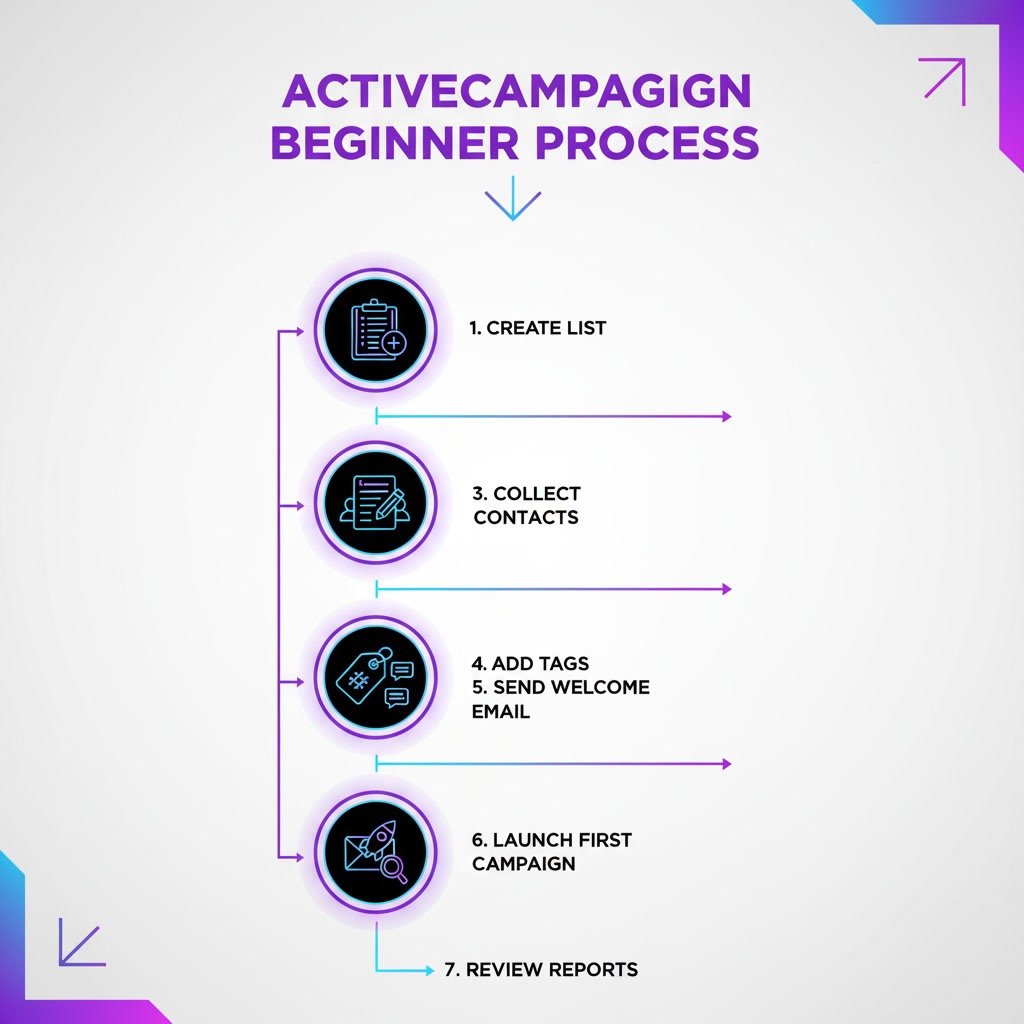
Step 1: Create Your Main List
Start with one list for your core audience. Name it clearly, such as “Main Newsletter” or “Website Leads.” Add your business details and default sender information so your emails look trustworthy and consistent.
Step 2: Build a Simple Signup Form
Create a basic form asking for the essentials, usually first name and email address. Connect it to your main list. If possible, add a tag based on signup source so you know where each subscriber came from.
Step 3: Create a Welcome Email
Write a short welcome email that thanks people for subscribing, sets expectations, and delivers any promised resource. Keep it simple, friendly, and relevant. This first email often has strong engagement, so make it count.
Step 4: Build One Starter Automation
Create an automation triggered when someone submits your form or joins your list. Add your welcome email, then consider one or two follow-up emails over the next few days. This gives every new subscriber a consistent introduction to your brand.
Step 5: Organize Contacts with Tags
As new contacts join, tag them based on form source, content interest, or subscriber type. This makes future campaigns more targeted and helps you avoid sending broad, irrelevant emails to everyone.
Step 6: Send Your First Campaign
Once your foundation is in place, create a regular campaign for your audience. Start with something useful, like a helpful update, resource, or announcement. Test the email, check formatting on desktop and mobile, and send it to a small internal list first if possible.
Use Cases for Beginners
Newsletter Growth
If your main goal is growing a newsletter, ActiveCampaign works well for collecting subscribers through forms, organizing them with tags, and sending regular emails with better targeting over time.
Lead Magnet Delivery
Many beginners use ActiveCampaign to deliver a free guide, checklist, or mini course automatically. Someone signs up through a form, receives the promised resource, and then enters a follow-up sequence.
Basic Sales Funnel Follow-Up
If you sell services or digital products, ActiveCampaign can help you send timely follow-up emails after a signup, webinar registration, or consultation request. Even simple automation can improve consistency and reduce manual work.
Customer Onboarding
After a purchase, you can use automation to send onboarding emails, usage tips, next steps, and support information. This is useful for SaaS products, online courses, memberships, and service businesses.

Best Practices for a Smooth Start
Keep Your First System Small
Do not build five automations, ten lists, and twenty tags in your first week. A smaller setup is easier to manage and easier to improve. Complexity should be earned over time, not added by default.
Name Everything Clearly
Use naming conventions that make sense later. For example, give tags names like “source:website-form” or “interest:email-marketing.” Clear names reduce confusion as your account grows.
Use Tags More Than Extra Lists
Beginners often overuse lists when tags would do the job better. In many cases, tags are more flexible and easier to manage. Too many lists can create duplicate contacts and messy segmentation.
Test Before You Send
Always send test emails to yourself before launching a campaign or automation. Check formatting, links, personalization fields, and subject lines. One quick test can prevent a poor subscriber experience.
Write for Real People
It is easy to get focused on triggers, workflows, and reporting, but email still comes down to communication. Write clear messages that feel useful and human. Better writing often matters more than fancier automation.
Review Reports Regularly
You do not need to obsess over every metric, but basic review matters. Look at which emails get opened, which links are clicked, and where engagement drops. Small improvements add up.
Common Mistakes Beginners Make
Building Automations Before Defining a Goal
Automation is helpful only when it supports a clear purpose. Before you create a workflow, ask what outcome you want. Is it onboarding, nurturing leads, delivering a free resource, or following up after a purchase?
Creating Too Many Lists
This is one of the most common mistakes. Too many lists make your account harder to manage and can create overlap. Start with one main list unless you have a strong reason to separate audiences completely.
Ignoring Contact Organization
If you do not use tags or fields early, your account becomes harder to segment later. Even a basic contact structure makes future email campaigns much more relevant.
Sending Emails Without Testing
Broken links, missing images, poor mobile formatting, and incorrect personalization can all reduce trust. Testing is a simple habit that saves time and prevents avoidable mistakes.
Overcomplicating the First Automation
Your first workflow does not need multiple branches, conditions, and goals. A short welcome sequence is enough to learn how the system works. Start simple, then refine as you gain confidence.
Not Cleaning the List Over Time
Even beginners should pay attention to list quality. If people never open or engage, deliverability can suffer over time. As your email program grows, regular list hygiene becomes more important.
FAQ
Is ActiveCampaign good for complete beginners?
Yes, but it has a learning curve. The platform is beginner-friendly once you focus on the basics first. Starting with forms, lists, tags, campaigns, and one welcome automation usually makes the learning process manageable.
What should I set up first in ActiveCampaign?
Start with one list, one form, one welcome email, and one automation. After that, organize contacts with a few useful tags and send your first campaign.
Do I need automations right away?
No, but one simple automation is worth setting up early. A basic welcome sequence helps new subscribers hear from you immediately without manual effort.
Should I use lists or tags?
For most beginners, tags are more flexible for organizing contacts. Use a small number of lists and rely on tags to track interests, sources, and actions.
How long does it take to learn ActiveCampaign?
You can learn the basics in a few hours, especially if your setup is simple. Becoming comfortable with segmentation, reporting, and automation logic usually takes more hands-on use over time.
What is the easiest first automation to build?
A welcome automation is usually the best starting point. It introduces your brand, delivers a promised resource, and sets expectations for future emails.
Final Verdict
ActiveCampaign can feel advanced at first, but beginners do not need to learn everything at once. If you start with the core pieces like lists, tags, forms, campaigns, and one simple automation, the platform becomes much more approachable.
This is a strong choice for people who want to move beyond basic email blasts and build a more organized email marketing system over time. It is especially well suited to creators, service businesses, and growing brands that want better segmentation and automation without losing control of the customer experience.
Recommended Guides
- ActiveCampaign Setup Guide for a Smooth First-Time Configuration
- ActiveCampaign Automation Examples: Real Workflows You Can Use in 2026
- ActiveCampaign Segmentation Guide: How to Target the Right Audience (2026)
- ActiveCampaign Segmentation Guide: Target the Right Audience
- ActiveCampaign Automation Examples: Real Workflows Explained
- How to Use ActiveCampaign for Email Marketing and Automation
- Why Your ActiveCampaign Automation Isn’t Triggering and How to Fix It
- ActiveCampaign Integration Not Working: A Clear Guide to Fix Common Issues
- ActiveCampaign vs Systeme.io (2026)
- Best ActiveCampaign Alternatives for Smarter Email Marketing