

This ActiveCampaign integration guide explains how to connect your tools so your data, campaigns, and automations work together.
Affiliate disclosure: This article may contain affiliate links. If you purchase through these links, we may earn a commission at no additional cost to you.
Introduction
ActiveCampaign becomes much more useful when it is connected to the rest of your business stack. Email marketing on its own can do a lot, but the real value appears when your forms, website, ecommerce platform, CRM activity, and customer data all flow into one place.
For many teams, integrations are the difference between a manual system and a reliable marketing process. Instead of exporting spreadsheets, copying tags, or updating contacts by hand, you can build a setup that keeps data current and triggers the right automations at the right time.
This guide focuses on how integrations work inside ActiveCampaign, what features matter most, where they fit in real workflows, and how to avoid the setup issues that cause confusion later.
Personal Insight
One of the biggest lessons with ActiveCampaign is that integration quality matters more than the number of apps you connect. A simple setup with clean fields, clear tags, and a few dependable automations usually performs better than a large stack of loosely connected tools. The best results tend to come from planning the data flow before turning everything on.

What Is the ActiveCampaign integration guide Really About?
An ActiveCampaign integration is a connection between ActiveCampaign and another platform, app, or service. That connection allows data to move automatically between systems, often in real time or on a schedule.
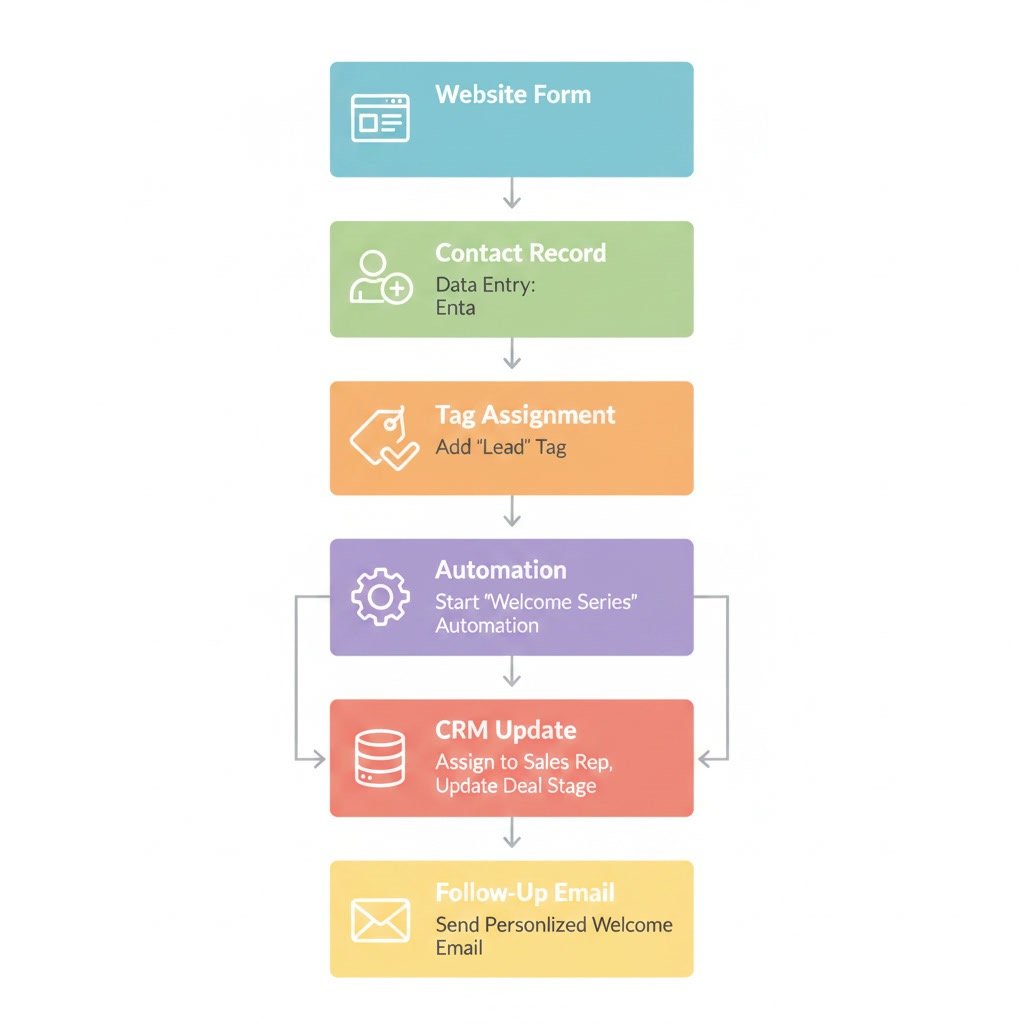
For example, someone might fill out a form on your site, get added to a list in ActiveCampaign, receive a welcome sequence, and then be tagged based on their interest. If they later make a purchase through your store, another integration can update their contact record and start a post-purchase automation.
These connections can happen in several ways:
- Native integrations built directly into ActiveCampaign
- Third-party connectors such as Zapier or Make
- API-based custom integrations for advanced business needs
- Embedded forms, tracking scripts, and site event connections
The goal is not just to connect software. The goal is to create a reliable system where contact data is accurate, actions are timely, and automations are relevant.
Why integrations matter
Without integrations, marketing teams often work with incomplete or outdated contact information. That leads to weak segmentation, missed follow-ups, duplicate records, and extra manual work. A connected setup improves visibility and helps every campaign become more targeted.
Key Features to Look for in ActiveCampaign Integrations
Two-way data sync
Some integrations only push data into ActiveCampaign. Others send updates both ways. Two-way sync is especially useful when sales, support, and marketing teams all need the same contact information.
Tags, custom fields, and lists
Strong integrations allow you to map incoming data to tags, fields, and lists in a structured way. This is what makes later segmentation and automation much easier.
Automation triggers
Many integrations can trigger automations based on user actions such as submitting a form, booking a demo, making a purchase, or reaching a certain stage in a pipeline. This is often the most valuable part of the setup.
Event tracking
Website visits, product views, cart activity, and custom events can give ActiveCampaign more context about each contact. This helps create behavior-based campaigns rather than generic email sequences.
Lead and deal creation
If you use the CRM side of ActiveCampaign, integrations can create or update deals automatically. That helps sales teams act faster without needing manual handoffs.
Conditional logic support
More advanced integrations support rules and logic. This lets you treat contacts differently based on source, interest, product type, or lifecycle stage.
Reliable syncing and error visibility
An integration is only helpful if it works consistently. Good setups make it easy to confirm that contacts are syncing correctly and to spot issues such as failed actions or missing field mappings.
Common Integration Types and Where They Fit
Website and form integrations
These are often the first connections businesses create. A website form can send new leads into ActiveCampaign, apply tags, and launch automations immediately. This works well for newsletter signups, lead magnets, webinar registrations, and contact requests.
Ecommerce integrations
Online stores benefit from sending order history, cart data, and customer behavior into ActiveCampaign. This supports abandoned cart reminders, post-purchase sequences, reorder campaigns, and customer retention workflows.
CRM and sales tool integrations
When lead data moves from forms or calls into a CRM-connected workflow, your sales process becomes more responsive. New leads can be scored, assigned, and followed up with faster.
Booking and scheduling tools
Appointment-based businesses often connect scheduling apps so contacts can receive confirmations, reminders, and follow-up emails based on booked sessions.
Payment and checkout tools
Payment tools can trigger customer onboarding, transaction confirmations, and upsell journeys. These integrations help tie purchase intent directly into lifecycle marketing.
Webinar and event platforms
These connections are useful for registration emails, reminders, attendance-based follow-up, and lead qualification after an event ends.

Use Cases That Show the Real Value
Lead capture and welcome automation
A visitor fills out a form on your site. Their details go into ActiveCampaign, a tag is applied based on the offer they requested, and they enter a welcome sequence tailored to that topic. This is a simple but high-value integration workflow.
Sales handoff from marketing to CRM
When a lead reaches a certain score or submits a demo request, a deal can be created automatically. That reduces response time and keeps marketing and sales activity connected.
Abandoned cart recovery
For ecommerce brands, cart abandonment data can trigger reminder emails, discount follow-up, or product-specific messaging. These campaigns depend on accurate integration between the store and ActiveCampaign.
Customer onboarding
After a customer purchases, an integration can move them out of a prospect sequence and into onboarding. This prevents irrelevant promotions and improves the customer experience.
Re-engagement campaigns
Activity from your website or product can help identify inactive contacts. You can then trigger a re-engagement series based on actual behavior rather than a generic inactivity rule.
Support-driven follow-up
If a customer submits a support request or closes a ticket, that event can update their status or start a helpful follow-up sequence. This keeps communication more relevant and timely.
Best Practices for a Clean Setup
Map your data before connecting anything
Decide what data should move into ActiveCampaign and where it should live. Identify which fields are essential, which tags are necessary, and what actions should trigger automations.
Keep naming conventions consistent
Messy tags and duplicate field names can turn a good integration into a confusing one. Use a simple naming system for lists, tags, pipelines, and automations.
Start with one core workflow
Rather than connecting every app at once, begin with one important workflow such as lead capture, purchase follow-up, or demo booking. Once that is stable, expand carefully.
Use tags with intention
Tags are useful, but too many can become difficult to manage. Use them for clear status changes, source tracking, or meaningful actions. Avoid creating new tags for every small event unless they support a real business purpose.
Test every trigger and action
Run test contacts through the full process. Check whether the right fields update, whether tags are applied correctly, and whether automations start and stop as expected.
Review duplicate handling
Contacts often enter from multiple sources. Make sure your setup updates existing records instead of creating unnecessary duplicates whenever possible.
Document your integration logic
Even small teams benefit from simple documentation. Write down which tools are connected, what data syncs, and what each automation does. This makes maintenance much easier later.
Common Mistakes That Cause Problems
Connecting tools without a plan
This is one of the most common issues. Businesses connect apps quickly, then discover that fields do not match, tags are inconsistent, or automations overlap in confusing ways.
Overcomplicating the stack
More integrations do not always create better results. Each added tool introduces more maintenance, more sync risk, and more places where data can break.
Ignoring field mapping details
If form fields, ecommerce data, or CRM records are mapped incorrectly, segmentation becomes unreliable. Small setup errors here often cause large reporting and automation problems later.
Using too many lists instead of better segmentation
Many users create separate lists for every source or interest group. In many cases, it is cleaner to use one main list with tags and custom fields for segmentation.
Failing to remove people from old automations
When contacts change stages, they should often leave one workflow and enter another. If this logic is not built in, people may receive mixed or outdated messages.
Not checking sync health regularly
Integrations can stop working because of expired permissions, changed fields, or app updates. A setup that worked last month still needs periodic review.
How to Choose the Right Integration Approach
Use native integrations when possible
Native connections are usually easier to manage and often more stable for standard use cases.
Use connector tools for flexibility
If you need to connect apps that do not have a direct integration, tools like automation connectors can bridge the gap. They are especially useful for small teams that want automation without custom development.
Use the API for advanced needs
Custom API setups make sense when you need very specific behavior, deeper product integration, or proprietary system connections. This route offers flexibility but requires more technical oversight.
FAQ
What can you integrate with ActiveCampaign?
You can integrate website forms, ecommerce platforms, CRMs, payment tools, booking apps, webinar platforms, support systems, and many other marketing or business tools.
Do I need technical skills to set up ActiveCampaign integrations?
Not always. Many common integrations are straightforward and use built-in settings or guided setup. More advanced workflows, custom fields, or API connections may require technical help.
What is the most important integration to set up first?
For most businesses, the best first step is connecting the main lead source, such as a website form, landing page, or checkout system. That gives you immediate value and a foundation for later automations.
Can integrations improve segmentation?
Yes. Integrations feed ActiveCampaign with behavior, source, and purchase data. That makes segmentation more accurate and helps you send more relevant messages.
How do I know if an integration is working correctly?
Test with sample contacts, review mapped fields, confirm tags and automations fire properly, and check records inside ActiveCampaign after each key action.
Should I use lists or tags for integration data?
In many cases, tags and custom fields are more flexible than creating many separate lists. The best choice depends on how you plan to segment and automate later.
Final Verdict
ActiveCampaign works best when it is part of a connected system rather than a standalone email tool. The right integrations help you keep contact data accurate, automate follow-up, and build workflows that respond to real customer behavior.
This topic is especially useful for businesses that already use forms, ecommerce, sales tools, or scheduling platforms and want cleaner automation without manual work. If you keep the setup simple, map your data carefully, and test each workflow before expanding, ActiveCampaign integrations can become one of the most practical parts of your marketing system.
Recommended Guides
- Activecampaign Pricing Explained
- Activecampaign Alternatives
- Is Activecampaign Worth It
- How To Use Activecampaign
- Activecampaign Tutorial For Beginners
- Activecampaign Setup Guide
- ActiveCampaign Automation Examples: Real Workflows Explained
- Best Email Marketing Tools in 2026
- Activecampaign Crm Guide
- ActiveCampaign Segmentation Guide: Target the Right Audience
- Activecampaign Campaign Builder Guide
- Activecampaign Ultimate Guide