

This ActiveCampaign segmentation guide explains how to organize contacts into meaningful groups so your emails feel more relevant and timely.
Affiliate disclosure: This article may contain affiliate links. If you purchase through these links, we may earn a commission at no additional cost to you.
Introduction
Segmentation is one of the most valuable features in ActiveCampaign because it helps you stop sending the same message to everyone. Instead of treating your list like a single audience, you can group contacts by behavior, interests, tags, location, purchase history, and many other data points.
That matters because better targeting usually leads to better results. When contacts receive content that matches what they actually want, open rates, clicks, and conversions tend to improve while unsubscribes often go down.
This guide walks through what segmentation means in ActiveCampaign, which features matter most, where it works best, and how to avoid common mistakes that make lists messy and hard to manage.
Personal Insight
One of the biggest shifts I see with email marketing is how quickly results improve once businesses move beyond one-size-fits-all campaigns. Even simple segments, like separating leads from customers or active readers from inactive contacts, can make emails feel much more useful. In ActiveCampaign, the real advantage is not just creating segments, but connecting them to automations and ongoing list management.

What Is ActiveCampaign Segmentation?
In ActiveCampaign, segmentation means filtering contacts based on shared characteristics or actions. These filters can be temporary, saved, or used inside campaigns and automations to decide who gets what message and when.
A segment can be built from many kinds of contact data, including:
- Tags
- Custom fields
- List membership
- Campaign activity
- Website behavior
- Purchase data
- Deal or CRM information
- Geographic details
- Date-based actions
For example, you might create a segment of contacts who joined your list in the last 30 days, opened at least one campaign, and clicked a link about a specific product category. That group is much more useful than your full list because it reflects actual engagement and interest.
Segments vs Tags vs Lists
These three terms are often confused, but they serve different purposes.
Lists are broad containers. Many businesses use only one or two main lists, such as newsletter subscribers or customers.
Tags are labels attached to contacts. They are useful for marking interests, actions, stages, or sources, such as webinar-registered, purchased-course, or interested-in-crm.
Segments are filters that pull contacts together based on conditions. A segment can include one tag, multiple tags, custom field values, campaign activity, and more.
In practice, tags store the data, while segments use that data to define an audience.
Key Features That Make Segmentation Powerful
Advanced condition builder
ActiveCampaign lets you combine conditions using AND and OR logic. This is important because real audiences are rarely defined by one detail alone. You may want contacts who are in a certain country, have clicked a pricing email, and do not yet have a customer tag.
Behavior-based targeting
You can segment contacts based on what they do. That includes email opens, clicks, site visits, event tracking, purchases, and automation activity. Behavior-based segments are often more valuable than static demographic segments because they reflect current intent.
Tag and custom field support
Tags and custom fields make segmentation flexible. Tags are great for fast labeling, while custom fields help store structured data such as company size, preferred service, lead source, or subscription type.
Dynamic audience updates
Segments update as contact data changes. If someone meets the conditions today but not next week, the segment adjusts automatically. This makes your targeting more accurate without constant manual cleanup.
Automation triggers and goals
Segmentation becomes much more useful when connected to automations. A contact can enter an automation because they match a segment, or move to a different sequence after meeting certain conditions. This helps create journeys that adapt to user behavior.
CRM and sales alignment
If you use ActiveCampaign’s CRM features, segmentation can also support the sales process. You can filter by deal stage, pipeline, assigned owner, or account details to send better follow-up messages or alert sales teams about qualified leads.
Use Cases
New subscriber onboarding
Not every new subscriber joins for the same reason. Some signed up for a lead magnet, others for a webinar, and others from a product interest form. Segmenting by source lets you send onboarding emails that match the original reason they joined your list.
Lead nurturing by interest
If your business serves multiple service lines or product categories, interest-based segmentation is essential. Someone interested in email automation should not get the same sequence as someone exploring CRM features. Segmenting by interest helps you keep messages relevant from the start.
Customer vs prospect communication
Customers and prospects need very different content. Prospects may need education, trust-building, and product information. Existing customers may need onboarding, support tips, upsell recommendations, or renewal reminders. A simple customer-status segment can improve email relevance immediately.
Re-engagement campaigns
Inactive contacts can lower engagement rates and reduce the quality of your email program over time. ActiveCampaign lets you build segments based on contacts who have not opened or clicked within a set period. You can then send a re-engagement sequence or clean your list more carefully.
Abandoned cart or purchase follow-up
For ecommerce businesses, segmentation based on purchase behavior is especially useful. You can target contacts who viewed products, started checkout, abandoned a cart, bought a certain category, or have not reordered within a typical buying window.
Event and webinar promotion
Instead of inviting your full list to every event, segment by topic interest, job role, or previous attendance. This usually produces better response rates and avoids fatigue among subscribers who are not interested.
Best Practices
Start with a simple segmentation framework
You do not need dozens of segments on day one. A strong starting framework often includes:
- Leads vs customers
- Engaged vs inactive contacts
- Interest categories
- Acquisition source
- Lifecycle stage
These segments cover a lot of practical use without making your account hard to manage.
Use tags with a clear naming system
Tags become messy fast if there is no structure. Create naming conventions that show purpose clearly, such as source-facebook-ad, interest-email-marketing, or status-customer. Consistent naming makes segments easier to build and review later.
Collect useful data gradually
It is tempting to gather every possible detail at signup, but too many form fields can reduce conversions. Start with the essentials, then collect more information over time through link clicks, preference centers, quizzes, surveys, or automation actions.
Combine profile data with behavior
Some of the best segments blend who a person is with what they do. For example, a segment of agency owners who clicked a CRM-related email in the last 14 days is much more useful than agency owners alone.
Review segment performance regularly
Segmentation is not set-and-forget. Check how your segments perform over time. If a segment produces low engagement, the conditions may be too broad, too narrow, or based on data that is no longer meaningful.
Keep automations aligned with segment logic
If your automations add and remove tags, update fields, or move contacts between stages, make sure those actions still support your segmentation rules. Good segmentation depends on clean data and predictable workflows.

Common Mistakes
Creating too many segments too early
Over-segmentation can make your account difficult to manage. If you build dozens of audiences before understanding how they will be used, you can end up with overlap, confusion, and inconsistent reporting. Start with core segments and expand based on real needs.
Using tags without a plan
Tags are flexible, but that flexibility can create clutter. Duplicate tags, vague labels, and outdated automation rules make segmentation less reliable. Every tag should have a purpose and a place in your larger system.
Relying only on opens
Open rate data can be helpful, but it should not be your only engagement signal. Clicks, purchases, page views, replies, and conversion actions often give a better picture of real interest.
Ignoring inactive contacts
If you never isolate disengaged contacts, your campaigns may become less effective over time. Create a process for identifying and re-engaging inactive subscribers, and remove or suppress contacts who no longer interact.
Building segments that are too broad
A segment like all newsletter subscribers may still be too general for targeted messaging. If the audience has different goals or experience levels, break it down further using interest, behavior, or customer stage.
Building segments that are too narrow
On the other hand, some segments become so specific that they are hard to use at scale. If an audience only contains a handful of contacts and has no clear business purpose, it may not be worth maintaining.
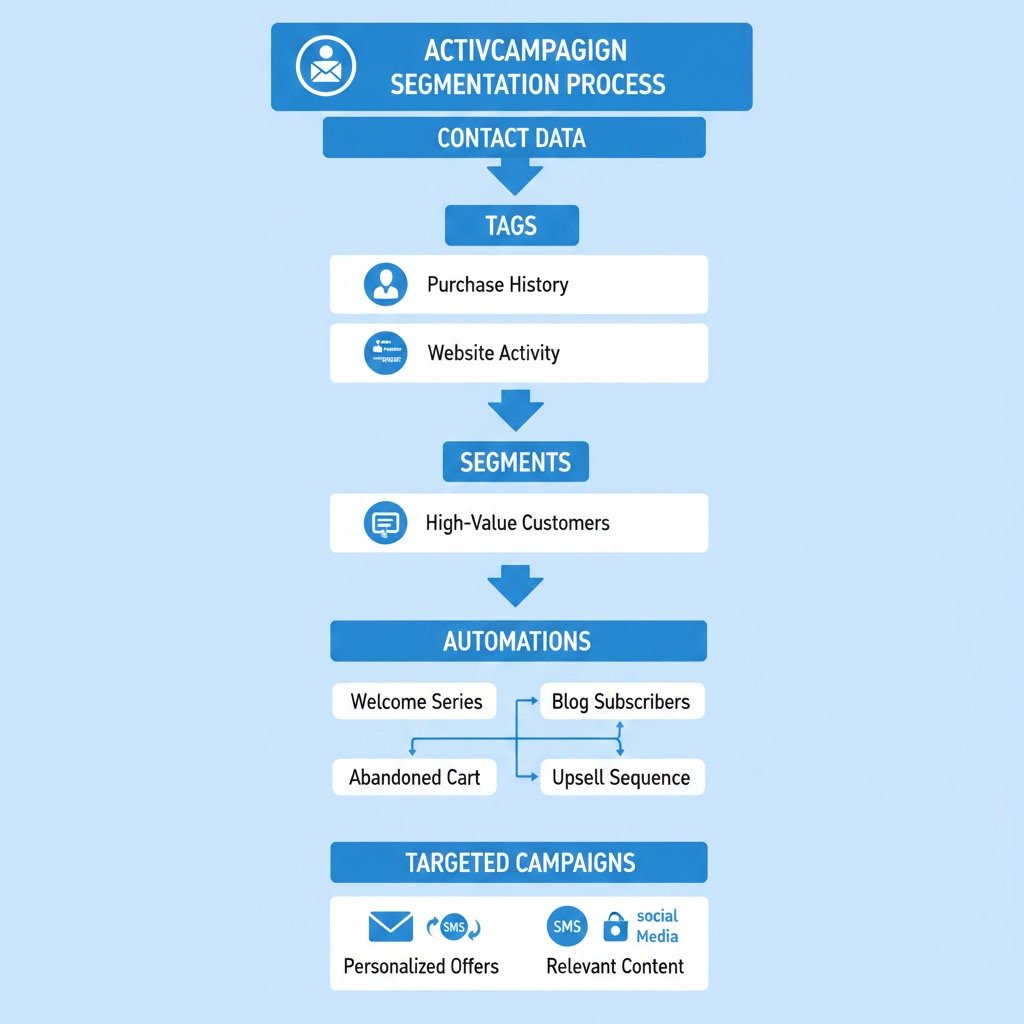
How to Build Better Segments in Practice
Define the business goal first
Before creating any segment, ask what outcome you want. Are you trying to improve onboarding, increase webinar registrations, recover inactive subscribers, or promote a product to interested leads? The goal should guide the conditions you use.
Choose the best data source
Once the goal is clear, identify which data points matter most. For onboarding, that may be signup source. For upsells, it may be purchase history. For lead nurturing, it may be content engagement or form submissions.
Keep segment names readable
Use names that describe both the audience and purpose, such as Engaged Leads – CRM Interest or Customers – Renew Within 30 Days. Clear names reduce errors when teams build campaigns or automations.
Test before scaling
Before using a segment in a large campaign, preview the contacts included and confirm that the logic is correct. A small mistake in AND/OR conditions can include the wrong audience or exclude valuable contacts.
FAQ
What is segmentation in ActiveCampaign?
Segmentation in ActiveCampaign is the process of grouping contacts based on shared data or actions, such as tags, custom fields, clicks, purchases, or automation behavior.
Should I use tags or segments in ActiveCampaign?
You usually need both. Tags store labels on contacts, while segments use those labels and other conditions to create target audiences for campaigns and automations.
How many segments should I create?
There is no fixed number, but it is best to start small. Focus on the segments that support your main goals, such as lifecycle stage, engagement level, and interest area.
Can ActiveCampaign segments update automatically?
Yes. Segments are dynamic and update when contact data changes, which helps keep targeting current without requiring constant manual edits.
What are the most useful first segments to build?
Good first segments usually include leads vs customers, engaged vs inactive contacts, interest-based groups, and acquisition source categories.
Why is segmentation important for email marketing?
Segmentation improves relevance. More relevant emails often lead to better opens, clicks, conversions, and subscriber experience because contacts receive content that fits their needs more closely.
Final Verdict
ActiveCampaign segmentation is one of the platform’s most practical strengths. It helps you move from broad email blasts to more relevant, behavior-driven communication that supports better engagement and cleaner automation logic.
If you are just getting started, keep it simple and build around a few core audience groups. If you already use ActiveCampaign regularly, refining your segmentation strategy can make your campaigns, automations, and CRM workflows noticeably more effective.
Recommended Guides
- How To Use Activecampaign
- Activecampaign Tutorial For Beginners
- Activecampaign Setup Guide
- ActiveCampaign Automation Examples: Real Workflows Explained
- Activecampaign Crm Guide
- Activecampaign Campaign Builder Guide
- Activecampaign Integration Guide
- Activecampaign Ultimate Guide