

ActiveCampaign for small business is a practical topic for owners who want better email marketing, automation, and customer follow-up without adding more busywork.
Affiliate disclosure: This article may contain affiliate links. If you purchase through these links, we may earn a commission at no additional cost to you.
Introduction
Small businesses often need better marketing systems long before they have time to build them. That is where tools like ActiveCampaign enter the picture. It combines email marketing, automation, contact management, and customer journey tracking in one platform.
For a small team, the main value is not just sending newsletters. It is creating a process that helps leads move forward, customers stay engaged, and routine communication happens automatically.
This article looks at how ActiveCampaign fits real small business needs, where it works best, and how to use it in a way that stays simple and effective.
Personal Insight
What stands out most about ActiveCampaign is that it can save a small business an enormous amount of follow-up time once the setup is done well. I have seen businesses get better results not because they sent more emails, but because they sent more relevant ones at the right time. The difference usually comes down to using automation thoughtfully instead of trying to turn on every feature at once.

What Activecampaign-for-Small-Business Really Means
When people ask whether ActiveCampaign is good for small business, they are usually asking a few different questions at once. Is it affordable enough? Is it too advanced? Will it actually reduce manual work? And can a small team use it without needing a dedicated marketing department?
The honest answer is that ActiveCampaign can be a strong fit for many small businesses, especially those that rely on email, lead nurturing, appointments, repeat customers, or segmented offers. It is not just a newsletter tool. It is better understood as a customer communication system.
For a small business, that can include:
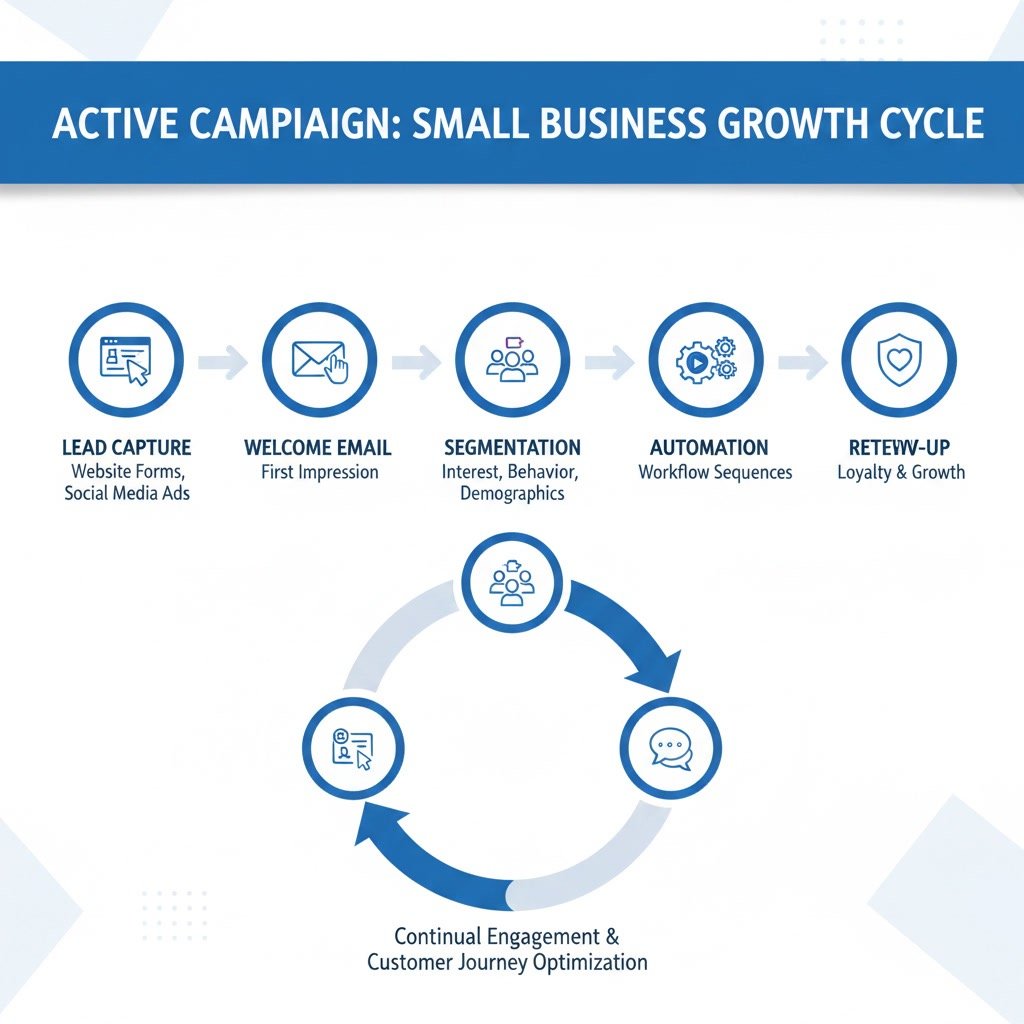
- Capturing leads through forms
- Sending welcome and follow-up emails automatically
- Tagging contacts based on behavior or interest
- Segmenting audiences for better targeting
- Tracking engagement across campaigns
- Supporting sales follow-up with CRM features on selected plans
The key is that small businesses do not need to use everything. They need to use the right parts well.
Key Features That Matter Most
Email marketing that goes beyond basic newsletters
Most small businesses start with email broadcasts. ActiveCampaign handles that easily, but it also adds stronger targeting and automation options than many entry-level platforms. You can send one-time campaigns, create scheduled sequences, and personalize messages using contact data.
This matters because a small audience does not mean one audience. Existing customers, recent leads, inactive subscribers, and high-interest prospects should not all get the same message.
Automation for follow-up and lead nurturing
Automation is one of ActiveCampaign’s biggest strengths. A small business can create workflows that trigger when someone joins a list, fills out a form, clicks a link, visits a page, or completes another action.
Examples include:
- A welcome series for new subscribers
- A booking reminder workflow
- A cart or inquiry follow-up sequence
- A re-engagement campaign for quiet contacts
- A post-purchase email path for repeat sales or reviews
This kind of automation helps small teams stay consistent even when they are busy.
Segmentation for more relevant communication
Segmentation helps you organize contacts based on behavior, source, location, purchase history, or level of interest. Instead of sending broad campaigns to everyone, you can send more focused messages to smaller groups.
That often leads to better opens, clicks, and conversions because the content feels more timely and useful.
Built-in CRM options for growing businesses
Some small businesses want marketing automation only. Others also want a simple way to track deals, conversations, and sales pipelines. ActiveCampaign can support both, depending on the plan and setup.
For service businesses, consultants, agencies, and B2B teams, that can be helpful because lead capture and sales follow-up can live closer together.
Reporting that supports smarter decisions
Small businesses do not need endless dashboards. They need clear signals. ActiveCampaign reporting can show open rates, click rates, automation performance, and contact behavior trends. Used properly, that helps you improve messaging rather than guessing what works.

Use Cases for Small Businesses
Local service businesses
Businesses such as clinics, salons, home services, coaches, or repair companies can use ActiveCampaign to automate appointment reminders, lead follow-up, review requests, and seasonal promotions. Instead of relying on manual texting or scattered email replies, they can create a more reliable communication flow.
Online stores and product-based brands
Ecommerce businesses can use it for welcome offers, abandoned cart reminders, post-purchase education, cross-sell campaigns, and win-back emails. Segmentation is especially useful here because contacts can be grouped by buying behavior.
Consultants and agencies
For businesses that sell expertise, trust-building matters. ActiveCampaign can support lead magnets, nurture sequences, webinar follow-up, consultation booking reminders, and long-term relationship emails. This helps move contacts from initial interest to qualified conversations.
Membership, course, and education businesses
Businesses that teach or deliver ongoing content can use automation for onboarding, lesson reminders, engagement tracking, and upsell paths. This creates a smoother user experience while reducing repetitive admin work.
B2B small businesses with longer sales cycles
When buyers need time before they commit, regular follow-up matters. ActiveCampaign helps keep leads warm with structured sequences, segmented updates, and internal notifications when someone shows stronger buying signals.
Best Practices for Getting Good Results
Start with one core workflow
The best starting point is usually a welcome sequence or lead follow-up automation. It gives immediate value and teaches you how the platform works without overcomplicating your setup.
If you try to build ten automations at once, you are more likely to create confusion than efficiency.
Clean your contact structure early
Before you start building campaigns, decide how you will use lists, tags, custom fields, and segments. A clean structure makes the platform much easier to manage later.
For many small businesses, fewer lists and smarter tagging is the better approach.
Write like a real person
Even good automation performs poorly when the emails feel cold or generic. Use clear subject lines, simple language, and a helpful tone. Small businesses usually do best when their emails sound personal and direct rather than overly polished.
Use segmentation before increasing volume
If your engagement is weak, the answer is not always more email. Often the better move is to send fewer campaigns to more relevant groups. Better targeting can improve results faster than higher sending frequency.
Review automation performance monthly
Automations should not be set and forgotten forever. Review open rates, click patterns, drop-off points, and conversion steps regularly. Small updates can improve performance over time without rebuilding everything.
Connect the tools you already rely on
ActiveCampaign becomes more useful when it connects with your forms, ecommerce platform, booking system, or CRM workflow. Strong integration reduces duplicate work and keeps contact data more accurate.
Common Mistakes Small Businesses Should Avoid
Using too many tags without a plan
Tagging is powerful, but uncontrolled tagging becomes messy quickly. If every action creates a new tag, your account can become difficult to understand. Build a simple naming system and use tags intentionally.
Sending the same message to every contact
A common mistake is treating all subscribers as one audience. New leads need different messaging than repeat customers. Segmentation exists for a reason, and small businesses benefit from it just as much as large ones.
Building complex automations too early
It is easy to be impressed by advanced workflows, but complexity does not guarantee better results. Start with practical automations that solve a real communication gap first.
Ignoring list hygiene
If inactive or low-quality contacts stay in your account too long, performance can suffer. Regular cleaning and re-engagement processes help maintain stronger email health and clearer reporting.
Not testing the customer experience
Small business owners often build a sequence and assume it works. But broken links, awkward timing, duplicate emails, or confusing paths are common. Test your forms, automations, and campaigns as if you were the customer.
Expecting instant results from setup alone
ActiveCampaign can improve efficiency quickly, but strong results usually come from a mix of better messaging, clearer segmentation, and steady refinement. The tool supports growth, but strategy still matters.
How to Decide if It Fits Your Business
ActiveCampaign is usually a good fit for small businesses that have one or more of the following needs:
- They want more than simple newsletters
- They need automated follow-up
- They have different audience segments
- They want to nurture leads over time
- They sell services, products, or expertise through email-driven journeys
It may feel like more than you need if you only want occasional basic campaigns with no real segmentation or automation. But if your business depends on timely communication and repeat touchpoints, the platform can become very valuable.
FAQ
Is ActiveCampaign too advanced for a small business?
Not necessarily. It has advanced features, but a small business can start with simple campaigns and one or two automations. The challenge is usually not the platform itself, but trying to use too much of it too quickly.
What type of small business benefits most from ActiveCampaign?
Businesses that rely on lead nurturing, appointments, repeat purchases, or segmented email marketing often benefit the most. This includes service providers, ecommerce brands, agencies, consultants, and education-based businesses.
Can ActiveCampaign replace other tools?
In some cases, yes. It can reduce the need for separate email tools, basic automation software, and some follow-up systems. For certain businesses, CRM functionality may also reduce tool overlap.
How long does setup usually take?
A basic setup can be done relatively quickly, especially if you focus on one list, one form, and one welcome automation. A more complete setup with integrations and segmentation takes longer but can be built in stages.
Does ActiveCampaign help with customer retention?
Yes. It can support retention through post-purchase follow-up, re-engagement campaigns, customer education emails, renewal reminders, and personalized offers based on past behavior.
Should a very small business use ActiveCampaign?
If the business wants automation and more targeted communication, it can be a strong option even for a very small team. If the need is only occasional bulk email, a simpler platform may feel easier at first.
Final Verdict
ActiveCampaign can be an excellent fit for small businesses that want to improve follow-up, personalize communication, and reduce repetitive marketing tasks. Its real strength is not just email sending. It is helping a small team create a more organized customer journey.
The best fit is for businesses that are ready to use automation with purpose, even if they start small. If that sounds like your situation, ActiveCampaign offers plenty of room to grow without forcing you to do everything on day one.
Recommended Guides
- Activecampaign Pricing Explained
- Activecampaign Alternatives
- Is Activecampaign Worth It
- ActiveCampaign Segmentation Guide: How to Target the Right Audience (2026)
- Activecampaign Campaign Builder Guide
- Activecampaign Integration Guide
- ActiveCampaign Email Delivery Tips: Improve Deliverability
- ActiveCampaign Automation Examples: Real Workflows Explained
- Activecampaign Login Not Working
- Activecampaign Contacts Not Syncing
- Activecampaign Campaign Not Sending
- Activecampaign Ultimate Guide